

| Photo | System requirements | |
 |
|
Operating systems: File formats: |
CAD-Editor and CAD-Viewer
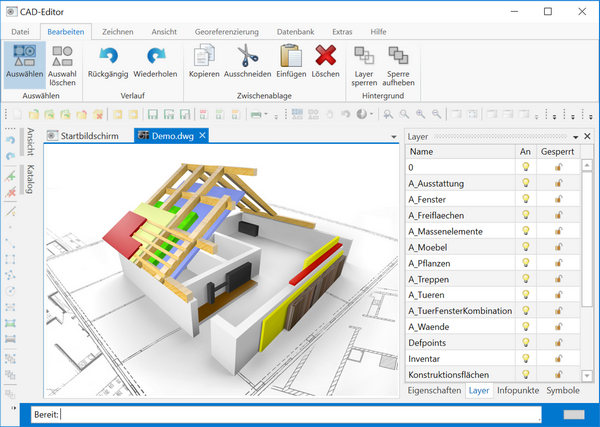
Our base products are the CAD-Editor and the CAD-Viewer. They allow DWG and DXF files to be loaded and saved, as well as other formats to be imported and exported. Several hundred functions are available to the user. In addition to the usual drawing and editing commands, user data can, for example, be attached to CAD objects, or function buttons can be integrated into the drawing, for instance to provide an easy way of navigating to another drawing.
Also in great demand is the option of saving the drawing as a PDF after making changes or viewing it in a preview before printing. Layers and layer filters are supported, as are blocks and xrefs. A small selection of functions can be found at the end of this article.
If you would like to ask whether your favourite function is supported, you can do so via our support team. As we have developed our products ourselves, we have so far been able to develop and add every function requested.
Fully customisable
The user interface can be adapted and modified as required. In industrial use, for example, a selection of functions can be chosen so as not to overload the user with too many functions. User profiles can be created and set up for basic users or experts, and changed or switched at runtime if required.
Integrable and scalable
Both the CAD-Editor and the CAD-Viewer can be integrated into your software, for example for a graphical preview or for graphical navigation. In other words, the programs can not only be run as standalone programs but can also be integrated into your program as components. As a .NET control, the CAD-Editor can easily be embedded in WPF applications and operated with its full functionality. Thanks to its simplicity, the CAD interface is also suitable for CAD beginners. All functions of the CAD-Editor can be executed via the CAD API.
The user interface of the UserControl can be customised without restrictions. You can display either just the drawing area without a user interface or the complete CAD-Editor with all user interface controls.
Functionality
Our CAD-Editor and our CAD-Viewer offer several hundred different functions.
Here is a selection of the most important main functions of the CAD-Editor and CAD-Viewer:
| Function | CAD-Editor | CAD-Viewer | |
| Load DWG/DXF | • | • | |
| Save DWG/DXF | • | ||
| Save as PDF | • | • | |
| Save as image file | • | • | |
| Save as SVG | • | • | |
| Print, print preview | • | • | |
| Draw | • | ||
| Edit objects | • | ||
| Insert images | • | ||
| Create, explode blocks | • | ||
| Edit attributes | • | ||
| Mark, highlight | • | • | |
| Manage layers | • | • | |
| Symbol catalogue | • | • | |
| Display properties | • | • | |
| Edit properties | • | ||
| Zoom, pan, rotation | • | • | |
| Create views | • | ||
| Profiles | • | • | |
| Permissions | • | • | |
| Help | • | • | |
| Integrable | • | • | |
| Customisable | • | • | |
| and many more | • | • |
Licences
Thanks to the low-cost licences and the wide range of possible uses, these are our most requested CAD programs. Get in touch with us; we can then write you a quotation tailored to your needs.

 kununu