
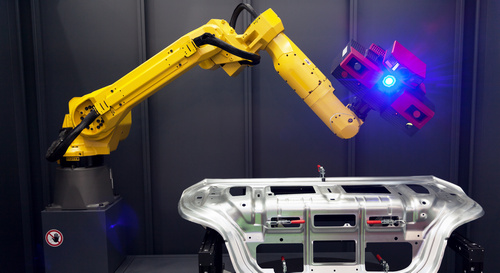
Image Processing
An inspection system runs flawlessly during trials. On the line it suddenly reports defects nobody can see – more often in the afternoon than in the morning. The algorithm is innocent; the light has changed. In image processing, the lighting decides what is in the image in the first place. No filter can later recover what the camera never saw.
Light is a tool, not an accessory
A studio photographer does not ask about the camera first, but about where the light is. Image processing is no different. The National Instruments guide names four levers: geometry, the arrangement of part, light and camera; structure, the shape of the light on the part; wavelength, in other words colour; and filters that block certain wavelengths or directions of light. If you set these four deliberately, you need less algorithm later.
Geometry: bright field or dark field
What matters is where a smooth surface reflects the light. If the reflection goes into the camera, the surface appears bright and every disturbance appears dark: bright field. If the light comes in at a low angle from the side, the smooth surface reflects it past the camera and stays dark. Only edges, scratches and embossing scatter light into the lens and light up: dark field. This gives the most important designs:
| Lighting | Effect | Typical task |
|---|---|---|
| Backlight | dark silhouette against a bright background | dimensions, holes, presence; telecentric rather than diffuse for shiny round parts |
| Ring light, low angle | dark field: smooth surface dark, raised features bright | scratches, embossing, engraving |
| Coaxial light | light along the camera axis, glare is put to use | flat, reflective parts |
| Dome | light from almost every direction, hardly any reflections | curved, shiny parts |
| Structured light | projected line or pattern | height and shape, for example with a laser line |
Two details often make the difference. Diffuse backlighting creates a border effect on shiny round parts such as shafts or screws; directed telecentric light largely avoids it. And a dome only works when it sits close to the part.
Wavelength: colour against colour
One simple rule goes a long way: light in the colour of a surface makes it appear bright, light in the opposing colour makes it dark. Red lettering on white cardboard almost disappears under red light. Under green or blue light it becomes dark and high in contrast. That is why a monochrome camera with coloured light is often the better choice than a colour camera with white light.
There are tools beyond the visible range, too. Infrared light evens out colour differences, for example when changing print gets in the way of a shape check, and penetrates some plastics more deeply. Blue light penetrates less and suits features right at the surface. Ultraviolet light excites fluorescence.
Filters and ambient light
There are three remedies against hall lighting and sunlight: short, powerful flashes that outshine the ambient light and freeze motion as a side effect; an enclosure; and filters. A bandpass filter that only passes the wavelength of your own LEDs keeps a lot of ambient light out. Polarising filters, used in pairs on the light and the camera, suppress glare. But they swallow a lot of light, and a longer exposure brings motion blur back.
Comparing lighting objectively
“Looks better” is not a criterion. Image the same parts under each lighting and measure how clearly the feature stands out from the background and how much of the image is saturated:
import cv2
import numpy as np

def assess(file, feature, background):
    """Image regions as (x, y, width, height)"""
    image = cv2.imread(file, cv2.IMREAD_GRAYSCALE)

    def values(region):
        x, y, w, h = region
        return image[y:y + h, x:x + w].astype(np.float64)

    f, b = values(feature), values(background)
    # Distance between the means relative to the spread: the larger, the more robust
    separation = abs(f.mean() - b.mean()) / (f.std() + b.std() + 1e-6)
    saturated = np.mean(image >= 255) * 100
    return separation, saturated

for file in ["ring_light.png", "dark_field.png", "dome.png"]:
    s, sat = assess(file, feature=(410, 220, 40, 40), background=(470, 220, 40, 40))
    print(f"{file}: separation {s:.1f}, saturated {sat:.2f} %")
A large separation value means the feature stands out reliably even when the image is noisy. Saturated pixels no longer carry any information. Evaluate several parts and several images, including borderline samples, and choose the lighting with the best worst value – not the one with the most attractive single image.
From practice
In laboratory devices such as the digital PCR reader from the joint project FREEDOM, our software controls the camera and LEDs itself. This makes the light part of the software: illumination and exposure are switched together, and the lighting setting belongs to the image just like the exposure time.
Typical mistakes
- White light with a colour camera where coloured light with a monochrome camera gives more contrast.
- Mounting the dome at a distance. Diffuse domes only work close to the part.
- Fitting polarising filters as a precaution and then fighting the darkness with long exposures.
- Accepting saturated images. Where pixels hit the limit, the information is gone.
- Assuming the brightness stays constant. Ageing, heat and dirt change it. A reference part or a regular check image reveals the drift.
- Forgetting eye protection. Strong UV light and lasers need shielding.
How we help
- Image processing feasibility study: we evaluate your sample images, develop a prototype and recommend camera, lighting and software – as a fixed-price starter package.
- Implementation: camera and LED control, image acquisition and evaluation in C#, C++ or Python, through to integration into your device.
- Your project: Request a project or book an initial consultation
- Case study: Software for a digital PCR reader
Sources: National Instruments, “A Practical Guide to Machine Vision Lighting”; Opto Engineering, “Illumination geometries and techniques”; case study “Software for a digital PCR reader” (BMBF joint project FREEDOM), Cadida case studies.
 kununu